How to Make Your No Scrubs AI Video
Five steps from photos to a finished clip, with a checklist for the photos and the mistakes worth avoiding.
Short answer: you need 1 to 3 photos and about five minutes. Open the No Scrubs AI page, give slot 1 the photo of whoever should star, add a friend for the left and the right if you have them, and press Remake this. You get a 15 second 4:3 MP4 at 480p with the clip's sound and no watermark. One video is 120 credits, which the $9.99 credit pack covers.
The button does the filming. This guide covers what it cannot decide for you: which photos hold up through ten quick cuts, who should stand where, and how to avoid a render you would rather not post.
What you need before you start
- Photos: 1 to 3, each showing a single adult.
- An account: you sign in with Google or with an email address when you press the button. Your photos wait for you while you do.
- Credits: 120 for one video. If your balance is short, the page offers a pack and returns you to the same photos after payment.
- Time: a minute to set up, then a few minutes of rendering that you do not have to sit through.
Step 1: give the middle to the strongest photo
Slot 1 is the lead, and the lead is on screen alone for close to six of the fifteen seconds: riding the lift, singing straight at the lens, and seen from the ceiling with arms out. No other place is looked at as hard.
So the question is less "who is the star of the group" and more "whose photo is the sharpest". A crisp, evenly lit picture of one friend will carry the video better than a dim one of the person you first had in mind. If the birthday girl only has a blurry photo, ask her for a new one before you render.
Step 2: decide who goes left and who goes right
The two side places are not equal. The left dancer gets two shots alone, one with a finger on the lips and one crouching with a hand and a foot aimed at the camera. The right dancer appears only when all three are in frame.
- Second-best photo: left.
- The friend who would rather not be singled out: right.
- Nobody for a place: leave the slot empty. The model invents a dancer for it and the price stays the same.
Step 3: run each photo through this checklist
- Face: turned to the camera, eyes visible, light even on both sides. No sunglasses, masks or beauty filters.
- Outfit: this is what the person will wear in every shot, so pick the photo for the clothes as well as the face.
- Length: head to shoes is ideal. When legs or feet are missing, plain trousers and sneakers are added to match the top.
- One person: crop friends, pets and bystanders out before you upload.
- Contrast between the three: different colors and different hair make it easy to follow who is who when the cuts come fast.
- Source: an ordinary phone photo beats a screenshot from a video or a heavily compressed picture from a chat.
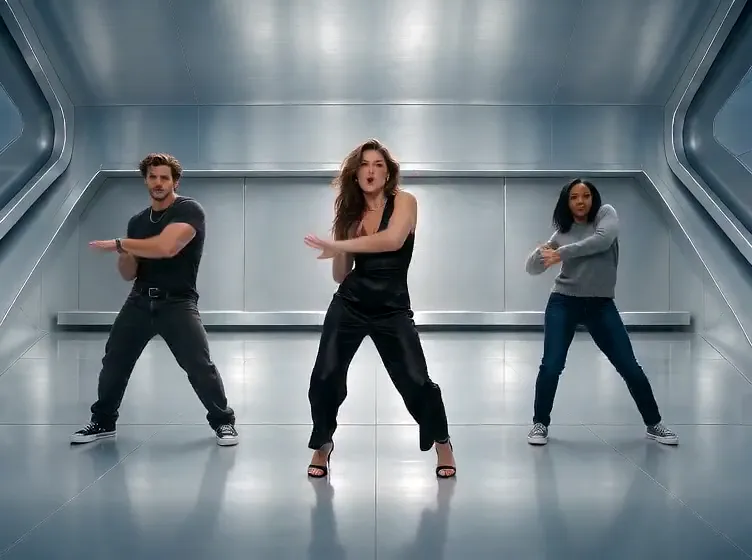
Three photos
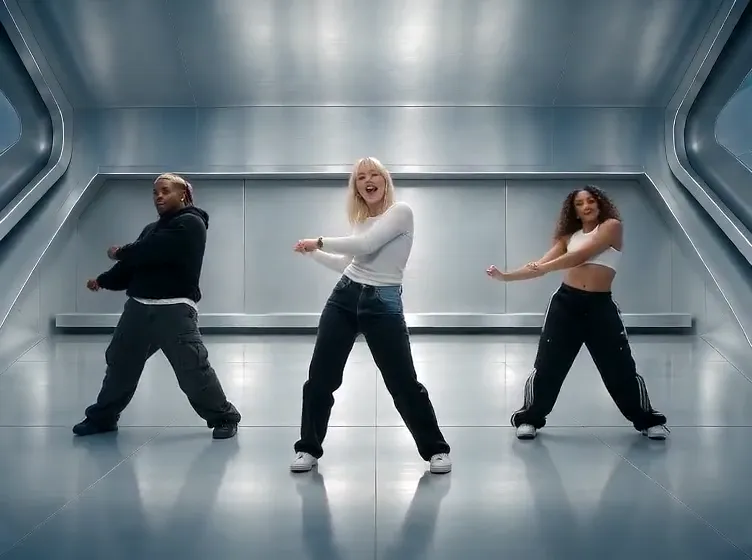
One photo
Step 4: choose the sound and render
Under the photo slots you choose between the clip sound and no sound. Keep the sound if you plan to send the file to friends as it is. Pick no sound if the app you post on tends to mute uploaded music; you can then attach the track from that app's own library.
Press Remake this. The button shows the price before anything is charged. After you sign in, the render starts on the same page and you are free to close the tab. The finished file shows up under the maker and in Assets.
Step 5: post it
The clip is 4:3, like the post that started the trend, so vertical feeds show it with a band above and below. People use that space for a caption with the three names.
Two habits keep it friendly: check with everyone in the photos before you make the video, and label it as AI-made when you post.
Five mistakes that spoil a No Scrubs AI video
- A soft photo in slot 1. The close-up magnifies blur. Swap the lead or retake the picture.
- Three people in near-identical dark outfits. Viewers lose track of who is who by the second cut.
- A chest-up photo when the outfit is the point. The model has to guess everything below the frame.
- Two faces in one photo. The effect expects one person per slot and may blend them.
- Hoping one photo becomes three of you. It does not: the other two places go to invented dancers.
One, two or three photos: which to pick
All three versions cost the same, so choose by who you want on screen.
| Photos | Who appears | Best for |
|---|---|---|
| 1 | You in the middle, two AI dancers | Solo creators, a quick test of your photo |
| 2 | You, one friend, one AI dancer | Couples and pairs of friends |
| 3 | You and a friend on each side | Friend groups, siblings, teams |
What it costs and what happens if a render fails
A video is 120 credits whatever the number of photos. The $9.99 pack pays for one, and the plans and larger packs on the pricing page bring the price of each video down. The effect has no free version, since it works from your photos.
If the model fails or refuses a request, the credits return to your balance without you asking. For a bigger cast, Tiny Desk AI seats up to five people, and every other model is on the AI video maker page.
FAQ
How long does the No Scrubs AI video take?
About a minute to add photos and press the button, then a few minutes of rendering. Rendering carries on after you close the tab, and the file lands in Assets.
Does a single photo work for No Scrubs AI?
Yes. Your photo takes the middle and the model adds a dancer on each side. They are new people, not copies of you.
Do I have to dress like the original video?
No. Everyone appears in the clothes their own photo shows, which is the point of the trend: everyday people on a glossy silver set.
Can I change the song or the dance moves?
No. The effect is a fixed 15 second routine with fixed cuts. For your own idea, write a prompt on the AI video maker page instead.
My render was refused by the safety check. What now?
Your 120 credits are already back in your balance. The model's check sometimes mistakes an ordinary photo for a well-known person and refuses to film it. Swap in another picture of the person in that slot, ideally a different angle in plain light with nobody else in it, and press the button again.
Should I use Genvima or a CapCut template for this trend?
A CapCut template is the pick if you already edit in CapCut. Use Genvima if you want three different people from three photos, each keeping their own clothes and build, rendered in the browser and saved as an MP4 you can post from any app.
Will it work with an anime character or my dog?
No. It is made for photos of real adults who agreed to take part. Characters from games or cartoons belong to their owners, and animals are outside what this routine was built for.
Which photos are not accepted?
Photos of children, of public figures, or of anyone who has not agreed to be in the video. Each photo should show one adult.
Is there a way to try it without paying?
Not this effect. There is no free version of No Scrubs AI: it works from your photos on a paid model. Genvima's free Basic engine (one free video and three free images a day) makes clips and pictures from a written prompt only, so it cannot use your photos. One video is 120 credits. If a render fails, those credits go back to your balance automatically.